
🔗 Related Links
中文
等价团队:重生(Team ProjectE Reborn)是 6LeoY 的模组 Team ProjectE 的MC高版本复刻,提供了为 等价交换重制版 模组玩家间共享EMC与知识的团队小组桥梁。
📖 关于
该模组在原 Team ProjectE 模组的基础上额外实现了下列功能:
- 支持了 Minecraft 1.21.1 版本。
- 修复了原模组当存档中已经存在EMC和知识数据时,加入原模组会清空原有的EMC和知识数据问题。 即使现有存档已有玩家的等价交换进度,加入本模组后也不会清空,而是顺利迁移。
- Xaero's Minimap 的EMC显示集成已经被移动到 Project Minimap Hud 模组 (v1.1.0 版本以后).
Integrated display of player/team EMC and EMC change rate in Xaero's Minimap display information.
- 优化了玩家加入小组、离开小组的EMC与知识数据计算逻辑,详见下方 使用方法 标题。
🥁 使用方法
每个小组的邀请人(发起人)为队长,拥有控制小组相关信息的权力。本模组使用命令进行操作小组,将来会支持GUI操作。
邀请玩家
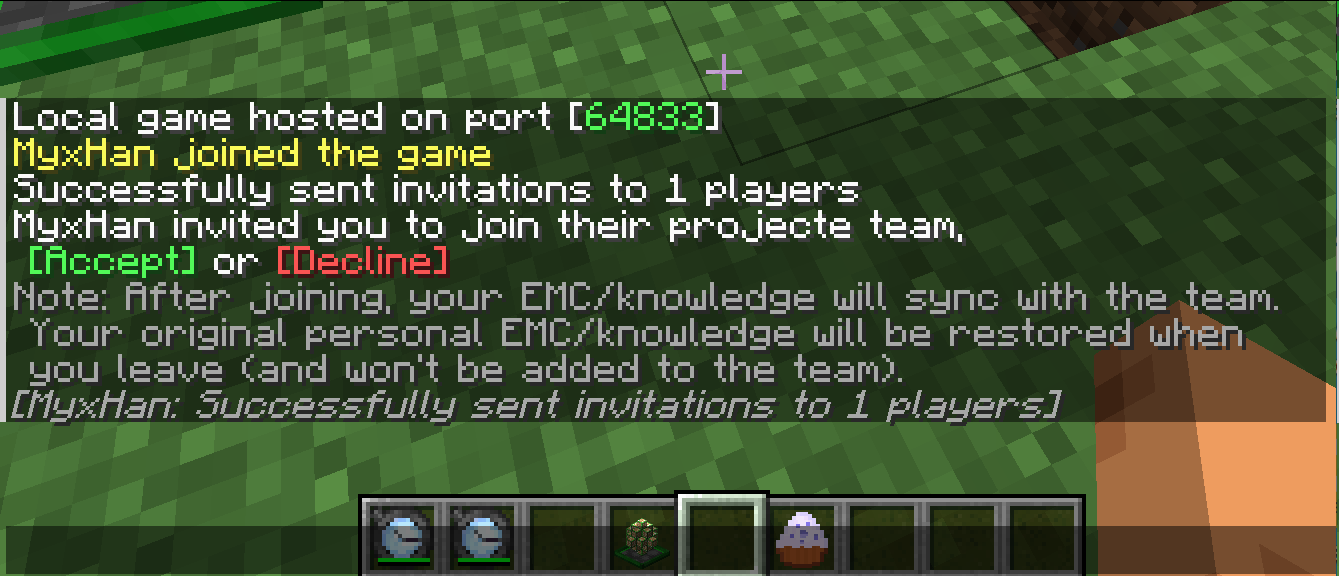
邀请一位玩家加入您的小组,然后对方的EMC与知识数据将被保存后替换为您的数据,即与您共享(可配置的)这些数据。
/teamper invite <player_name>
离开您当前的小组
当玩家离开小组时,其EMC与知识数据将被还原为该玩家加入小组时的状态。如果是队长在加入前没有相关数据,则会保留其的数据。
/teamper leave
其他指令
在这里就不过多一一介绍了,因上方的两个的计算逻辑与原模组差异甚大,所以多做阐述,详情参见下方英文版(懒得翻译了)。
🎮 模组的兼容性
该模组应该兼容大部分等价交换的附属,其中下方的等价交换附属是测试通过的:
- Project Expansion MC1.21.1 ✔
- 等价兼容(ProjectE Integration) MC1.21.1 ✔
- 等价交换:小地图Hud(Project Minimap Hud) MC1.21.1 ✔
❤ 鸣谢
- 感谢 6LeoY、Alic Szecsei、90 创造了 Team ProjectE 原模组,如果没有他们就没有这个重生版。
English
This mod forked from Team ProjectE by 6LeoY, please do not report problems to the original work.
📖 About:
This mod inherits the functionality of the original Team ProjectE mod, but adds a few improvements and enhancements:
- Shared EMC and knowledge with your projecte team members.
Changes:
- Support MC 1.21.1
- Fixed an issue where EMC and knowledge were cleared when the mod was added to a world that had already been created. Even if the existing saves already exist the EMC and knowledge data of the player, they will not be cleared.
- The integration of Xaero's Minimap emc display has been moved to Project Minimap Hud (after v1.1.0).
Integrated display of player/team EMC and EMC change rate in Xaero's Minimap display information. - Optimized the logic of players joining team to deal with EMC and knowledge. See usage below for details.
- Fixed an issue where the transfer ownership command would not synchronize in real time.
🥁 Usage:
The command is used to operate the team, and the management interface of the GUI is in the plan.
Invite players
Invite a player to join your team, and his EMC and knowledge will be saved and replaced with yours, sharing the team with you.
/teamper invite <player_name>
Leave your current team
When a player leaves, replace the player's progress before the player joins the team. If the captain transfers the CAPTAIN without saving before joining the team, the progress in the team will be preserved when he leaves the team.
/teamper leave
Kick a team member
Refer to "Leave your current team" above for logic of progress data.
/teamper kick <member_name>
List team members
Only if team members > 1.
/teamper members
Transfer ownership
/teamper transfer_ownership <member_name>
Settings
Only if team members > 1 && player is team owner.
Set EMC sharing, default: true
/teamper settings share_emc <boolean>
Set knowledge sharing, default: true
/teamper settings share_knowledge <boolean>
🎮 Compatibility
Should be compatible with most PE additions. Here are the ones that have been tested:
- Project Expansion MC1.21.1 ✔
- ProjectE Integration MC1.21.1 ✔
- Project Minimap Hud MC1.21.1 ✔
Thanks
- Thanks to 6LeoY, Alic Szecsei, 90 for creating the Team ProjectE mod, which would not have been possible without them.